Cómo crear una tienda de Shopify en 30 minutos
Cómo crear una tienda de Shopify en menos de 30 minutos con un creador de tiendas con IA. Una guía paso a paso, desde la importación de productos hasta la marca y el lanzamiento.
Puedes crear una tienda de Shopify en menos de 30 minutos: sin programar, sin saber diseñar y sin contratar a nadie. La clave está en usar un creador de tiendas con IA para automatizar el trabajo que antes llevaba semanas: importar productos, diseñar la marca, escribir los textos y montar las páginas.
Este es el camino más rápido hasta una tienda publicada:
-
Usa un creador de tiendas de Shopify con IA como Dropmagic para generar toda tu tienda —marca, páginas de producto y tema— a partir de un solo prompt
-
Importa productos en un clic desde Amazon, AliExpress o Alibaba, con descripciones optimizadas por IA
-
Configura los pagos y los impuestos con Shopify Payments, PayPal y el cobro automático de impuestos en EE. UU.
-
Prueba la tienda en móvil y en escritorio y publícala
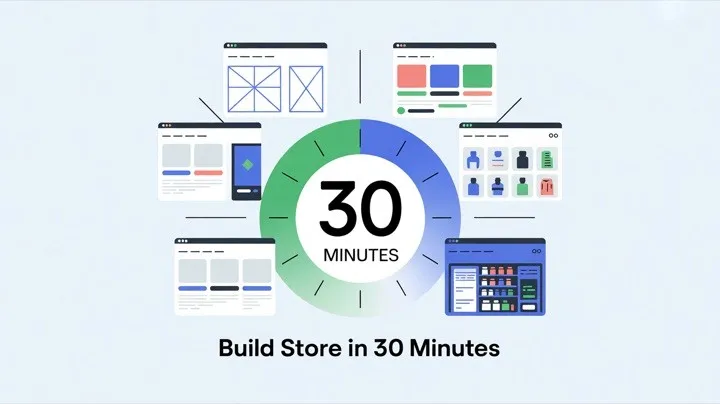
Los comerciantes que usan herramientas de creación de tiendas con IA lanzan muchísimo más rápido que quienes lo hacen a mano. Todo el proceso que sigue lleva 25–30 minutos.
Paso 1: prepara lo esencial de tu tienda (5 minutos)
Antes de empezar a construir, reúne esto para no perder tiempo:
-
Nombre del negocio y nicho: ten claro qué vendes y a quién
-
Datos de los productos: nombres, precios y URL de origen (enlaces de producto de Amazon, AliExpress o Alibaba)
-
Logo y colores: si no los tienes, la IA de Dropmagic los genera automáticamente
-
Políticas de la tienda: zonas de envío, política de devoluciones y cómo vas a atender al cliente
Crea tu cuenta de Shopify
Entra en Shopify.com y regístrate. Elige Estados Unidos como país para configurar automáticamente la moneda en USD, las fechas en formato MM/DD/YYYY y el formato numérico de EE. UU.
Shopify tiene una prueba gratuita, así que no pagas nada hasta que estés listo para lanzar. Durante el registro, elige “Estoy empezando” si eres nuevo: Shopify te añade una guía extra de puesta en marcha.
Conecta un dominio ahora o más tarde. Puedes comprarlo en Shopify ($11–$15/año para un .com) o conectar uno que ya tengas. Tener el dominio desde el principio te ayuda a visualizar la tienda final.
Paso 2: crea tu tienda con IA (10 minutos)
Aquí es donde un creador de tiendas de Shopify con IA te ahorra horas de trabajo manual. En lugar de personalizar un tema vacío sección por sección, la IA genera toda tu tienda automáticamente.
Opción A: usa Dropmagic (recomendado)
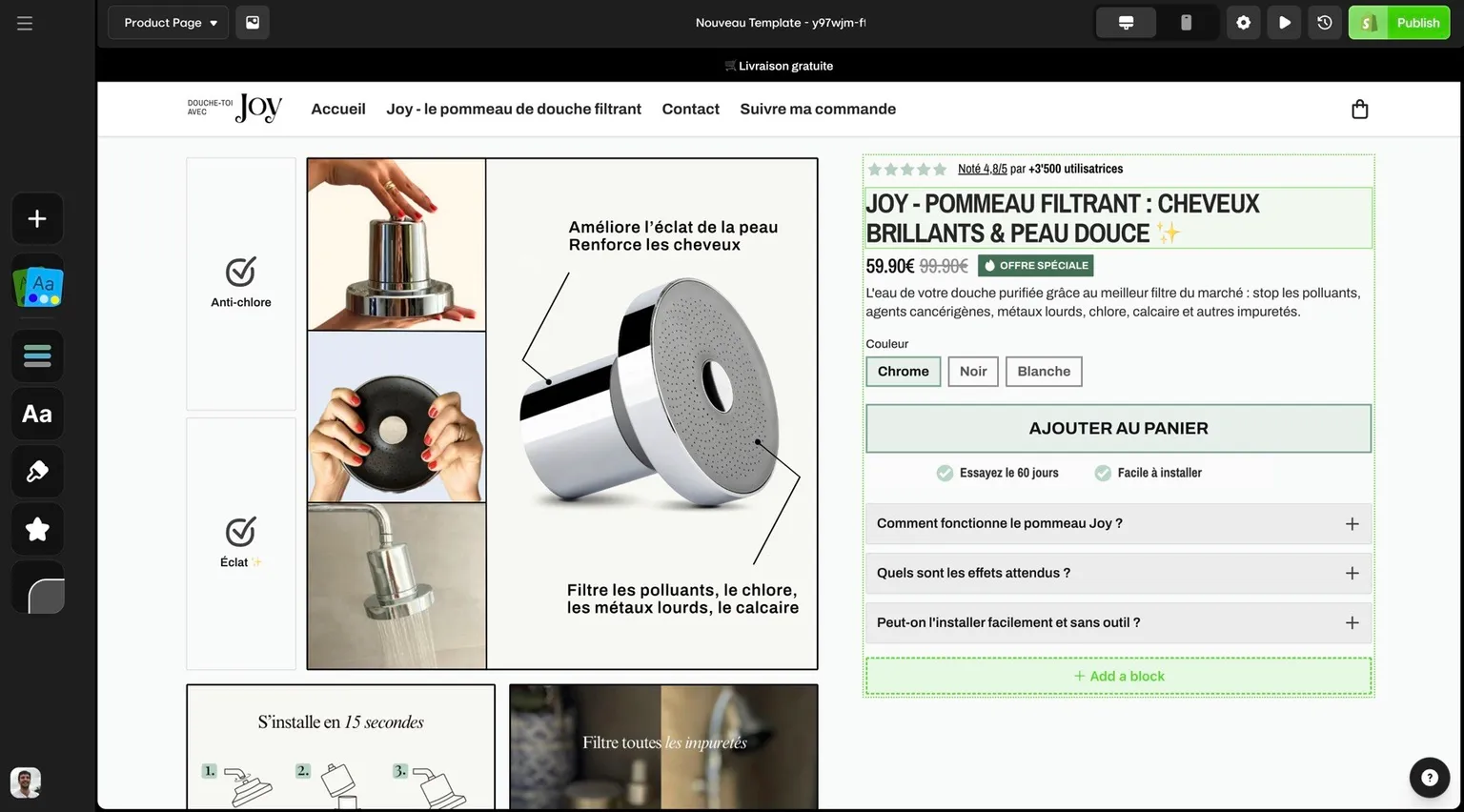
Dropmagic es un creador de tiendas con IA diseñado específicamente para Shopify. Así funciona:
-
Describe tu tienda: dile a la IA tu nicho, tu público objetivo y tu estilo (por ejemplo, “equipamiento outdoor minimalista para millennials activos”)
-
La IA lo genera todo: identidad de marca (colores, tipografías, estilo de logo), diseño de las páginas, navegación y secciones orientadas a la conversión
-
Importa productos: pega URL de producto de Amazon, AliExpress o Alibaba. La IA extrae las imágenes, las especificaciones y los precios, y después escribe descripciones de producto optimizadas para compradores de EE. UU.
-
Personaliza: usa el editor visual de arrastrar y soltar para retocar cualquier cosa que haya generado la IA
Todo el proceso lleva unos 10 minutos. Para ver en detalle cada función de IA, consulta nuestra guía de funciones del creador de tiendas con IA.
Opción B: configuración manual con Shopify Magic
Si prefieres construirla a mano, el tema Dawn gratuito de Shopify + Shopify Magic es una alternativa sólida:
-
Dawn es responsive, rápido y gratuito con cualquier plan de Shopify
-
Shopify Magic escribe descripciones de producto y genera contenido a partir de prompts
-
El editor de secciones Flex te deja crear diseños personalizados sin código
El camino manual lleva más tiempo (1–3 horas), pero te da un control más fino. Para comparar los dos enfoques, consulta Shopify Magic vs Dropmagic.
Marca con IA: colores, logo y tipografía
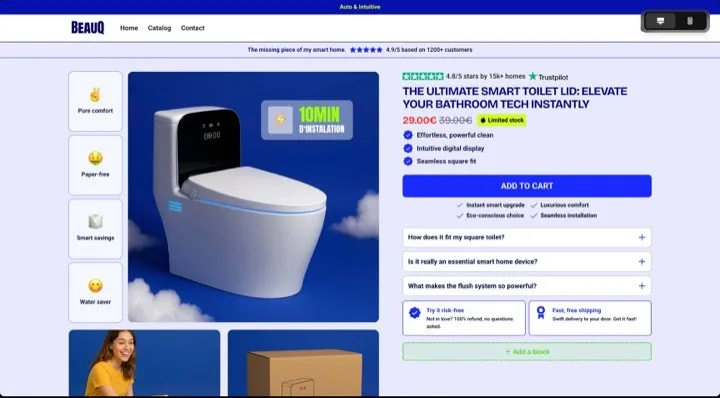
Uses Dropmagic o lo hagas a mano, tu tienda necesita una marca coherente. El generador de marca con IA de Dropmagic crea una identidad visual completa —paleta de colores, combinaciones tipográficas y diseños de banner— a partir de tu nicho y tu público.
Según un estudio de Lucidpress sobre coherencia de marca, presentar la marca de forma coherente aumenta los ingresos un 23 % de media. Las herramientas de marca con IA hacen que cada página, cada ficha de producto y cada email encajen con tu identidad visual.
Paso 3: añade productos con importación por IA (5 minutos)
Añadir productos a mano —escribir descripciones, ajustar imágenes, montar variantes— llevaba 15–30 minutos por producto. Las herramientas de IA lo reducen a menos de un minuto.
Importación de productos en un clic
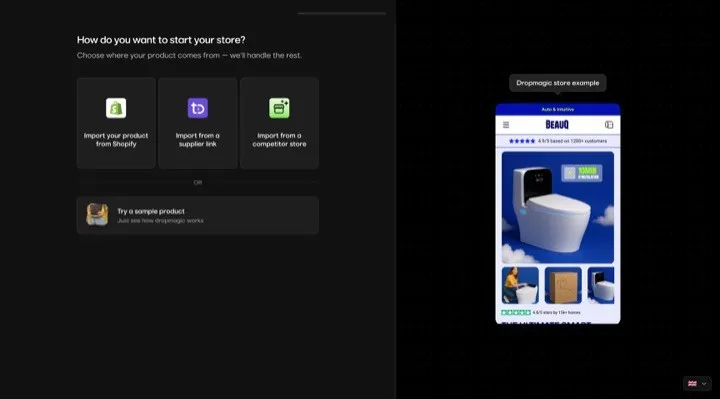
Con Dropmagic, añadir productos funciona así:
-
Encuentra un producto en Amazon, AliExpress o Alibaba
-
Copia la URL del producto
-
Pégala en Dropmagic
La IA extrae imágenes de alta calidad, especificaciones y precios. Después:
-
Convierte los precios a USD y las medidas a unidades imperiales
-
Genera descripciones de producto optimizadas para SEO, pensadas para compradores de EE. UU.
-
Crea variantes de talla y color automáticamente (S, M, L, XL + muestras de color)
-
Configura el seguimiento de inventario de cada variante
“I launched a full store in 12 minutes. I didn’t touch a theme, write a word, or install a single app.” — Lucas D., usuario de Dropmagic
“Lancé una tienda completa en 12 minutos. No toqué ningún tema, no escribí ni una palabra y no instalé una sola app.”
Para estrategias de redacción de descripciones que convierten, consulta nuestra guía sobre cómo escribir descripciones de producto que convierten.
Consejos de fotografía de producto
Los compradores abandonan la compra con frecuencia cuando faltan imágenes del producto o son de baja calidad. Las herramientas de importación con IA traen las mejores imágenes de las plataformas de origen, pero deberías:
-
Asegurarte de que la imagen principal tenga un fondo blanco o neutro y limpio
-
Incluir al menos 4–5 imágenes por producto (frontal, trasera, detalle, lifestyle, escala)
-
Comprimir las imágenes para que carguen rápido: las imágenes sin optimizar son uno de los mayores culpables del peso de una página en móvil
Paso 4: configura pagos, impuestos y políticas (5 minutos)
Con los productos cargados, configura los ajustes de negocio que te permiten cobrar de verdad.
Conecta los métodos de pago
Ve a Configuración > Pagos en tu admin de Shopify. Activa:
-
Shopify Payments: procesador integrado compatible con Visa, Mastercard, Amex, Apple Pay, Google Pay y Shop Pay. Tarifas competitivas (2,9 % + $0,30 en el plan Basic)
-
PayPal: se vincula automáticamente al email de tu tienda. Más de 220 millones de usuarios en todo el mundo. Tarifas: 1,9 %–3,4 % por transacción
-
Venmo: se activa automáticamente con la integración de PayPal Wallet
Shopify afirma que las tiendas que ofrecen Shop Pay tienen tasas de conversión en el checkout un 15 % más altas que las de plataformas de la competencia, y hasta un 50 % más altas que con el checkout como invitado.
Configura el cobro de impuestos en EE. UU.
Ve a Configuración > Impuestos y aranceles > Estados Unidos:
-
Haz clic en “Cobrar impuesto sobre las ventas”
-
Para cada estado en el que estés registrado, introduce tu ID de impuesto sobre las ventas
-
Revisa las tarifas por defecto para asegurarte de que son correctas
Shopify calcula el impuesto sobre las ventas automáticamente según la ubicación del cliente. Aun así, tú eres responsable de registrarte en los estados donde tengas nexus (una presencia comercial significativa) y de declarar y pagar los impuestos. Consulta a un asesor fiscal si no sabes qué estados exigen registro.
Crea las políticas de tu tienda
Ve a Configuración > Políticas. Shopify ofrece templates para:
-
Política de devoluciones y reembolsos: clave para la confianza del cliente. Las tiendas con políticas de devolución claras convierten notablemente mejor
-
Política de envío: define las zonas de envío, los plazos estimados de entrega y los costes
-
Política de privacidad: obligatoria por ley en muchos estados de EE. UU.
-
Términos del servicio: protegen tu negocio legalmente
Añade los enlaces a las políticas en la navegación del pie de página para que los clientes las encuentren fácilmente.
Paso 5: prueba y publica tu tienda (5 minutos)
Pruebas en móvil
Con el 81 % del tráfico de Shopify llegando desde móvil (Shopify, 2025), probar en el teléfono no es negociable:
-
Mira cada página en tu teléfono real (no solo en la vista previa del navegador)
-
Pulsa todos los botones: ¿se alcanzan bien con el pulgar?
-
Comprueba la velocidad de carga de las imágenes
-
Recorre todo el flujo de compra desde el móvil
“Smaller screens on mobile mean that you need to account for more vertical scrolling when designing content.” — Kellie Kowalski, responsable de diseño UX en Fuel Made, en la guía de UX móvil de Shopify
“Las pantallas más pequeñas del móvil obligan a contar con más scroll vertical al diseñar el contenido.”
Usa Google PageSpeed Insights para revisar tus Core Web Vitals. Apunta a una puntuación en móvil por encima de 70.
Transacciones de prueba
Activa el Bogus Gateway de Shopify (Configuración > Pagos > Gestionar > Modo de prueba) para simular compras:
| Tipo de tarjeta | Número de prueba |
|---|---|
| Visa | 4242424242424242 |
| Mastercard | 5555555555554444 |
| American Express | 378282246310005 |
Prueba estos escenarios:
-
Compra correcta con código de descuento
-
Pago fallido (usa la tarjeta 4000000000000002)
-
Distintas direcciones de envío y códigos postales
-
Emails de notificación de pedido
-
Flujos de reembolso y cancelación
Publica la tienda
-
Quita la protección con contraseña de tu tienda (Tienda online > Preferencias)
-
Configura Google Analytics o Shopify Analytics
-
Vigila de cerca tus primeros pedidos: revisa las notificaciones, la preparación de los envíos y la comunicación con el cliente
Tu cronología de lanzamiento en 30 minutos
| Paso | Tarea | Tiempo | Herramienta |
|---|---|---|---|
| 1 | Preparar lo esencial + crear la cuenta de Shopify | 5 min | Shopify |
| 2 | Crear la tienda con IA (marca, tema, diseño) | 10 min | IA de Dropmagic |
| 3 | Importar productos con descripciones de IA | 5 min | IA de Dropmagic |
| 4 | Pagos, impuestos y políticas | 5 min | Admin de Shopify |
| 5 | Probar en móvil + publicar | 5 min | Móvil + PageSpeed |
Total: ~30 minutos desde crear la cuenta hasta tener una tienda de Shopify publicada y lista para convertir.
Con eso te unes a los millones de tiendas de Shopify activas en todo el mundo. Tu prueba gratuita pasa a costar solo $1/mes durante los tres primeros meses: aprovecha ese tiempo para mirar las analíticas y optimizar antes de comprometerte con un plan completo.
Qué hacer después del lanzamiento
Crear tu tienda de Shopify es el primer paso. Esto es lo que viene después:
-
Empieza a hacer dropshipping gratis: nuestra guía repasa las herramientas y los métodos gratuitos para empezar a vender sin coste inicial
-
Usa DSers para la preparación de pedidos: conecta DSers para automatizar la preparación de pedidos con proveedores de AliExpress
-
Optimiza tus páginas de producto: usa nuestro checklist de secciones de Shopify para mejorar la conversión
-
Usa templates de IA: aprovecha templates de IA ya hechos para landing pages, páginas de producto y más
-
Mide el rendimiento: usa Shopify Analytics para seguir las tasas de conversión, el valor medio del pedido y las fuentes de tráfico
FAQ
¿Cuánto se tarda realmente en crear una tienda de Shopify con IA?
Con un creador de tiendas de Shopify con IA como Dropmagic, puedes pasar de cero a una tienda publicada en 25–30 minutos. La IA automatiza los pasos que más tiempo consumen: generar tu identidad de marca, escribir las descripciones de producto, montar el diseño de las páginas y optimizar para móvil. Sin IA, ese mismo proceso suele llevar 8–20 horas repartidas en varias sesiones. Los comerciantes que usan Dropmagic dicen publicar su primera tienda un 83 % más rápido que personalizando un tema de Shopify a mano.
¿Puedo crear mi tienda con IA gratis?
Sí. Dropmagic tiene una prueba gratuita con todas las funciones de IA, y Shopify ofrece un periodo de prueba gratis más $1/mes durante los tres primeros meses. Shopify Magic (gratis en todos los planes) añade generación de contenido con IA. Si buscas algo totalmente gratuito, Buildyourstore.ai genera tiendas sin coste: solo pagas la suscripción de Shopify. Consulta nuestra guía completa para empezar a hacer dropshipping gratis si quieres más opciones.
¿Cuál es el mejor tema de Shopify para principiantes?
Para una configuración manual, el tema Dawn gratuito de Shopify es el mejor punto de partida: es rápido, está optimizado para móvil y funciona con Shopify Magic. Ahora bien, si quieres saltarte del todo la elección de tema, un creador de tiendas con IA como Dropmagic genera un tema a medida de tu nicho y tu público. Para una comparativa completa de page builders y temas, consulta nuestra guía de los mejores temas de Shopify y creadores de tiendas con IA.
¿Necesito saber programar para crear una tienda de Shopify?
No. Todas las herramientas de esta guía —Shopify, Dropmagic, Shopify Magic— usan editores de arrastrar y soltar o automatización con IA. Cero código. Si más adelante quieres personalizaciones avanzadas, Shopify Magic incluso puede generar código Liquid del tema a partir de prompts de texto.
¿Cuánto cuesta crear una tienda de Shopify?
Costes mínimos: $0 para empezar (pruebas gratuitas) y después $1/mes durante los 3 primeros meses. A partir de ahí, los planes de Shopify oscilan entre $39 y $399/mes. Usar un creador de tiendas con IA como Dropmagic te ahorra contratar a un diseñador profesional ($500–$5.000) o a un copywriter ($200–$1.000). Para un desglose detallado de costes por plataforma, consulta nuestra comparativa de las mejores plataformas de ecommerce para dropshipping.
¿Buscas una forma con IA de montar tu tienda de dropshipping? Consulta nuestra guía completa de creadores de tiendas de dropshipping con IA en 2026.